Web3 Security 101: How Not To Lose Your Crypto
 Alex D
You’ve probably heard the phrase before: “In crypto, you are your own bank.”
It sounds empowering — and it is. For the first time in financial history, ordinary people can hold and transfer value without relying on any bank, broker, or middleman. No one can freeze your account. No one can deny you a transaction.
But that freedom comes at a cost. When you are your own bank, there is no customer support line. There are no chargebacks. If someone drains your wallet or you lose access to it or your password, no institution is going to step in and cover your losses.
That is the trade-off at the heart of Web3, the broader ecosystem of blockchain apps, crypto wallets, and decentralized finance: the same design that gives you full control also gives you full responsibility.
This article is a practical guide on how to keep your crypto safe. We’re not going to overwhelm you with theory. Instead, we’ll walk through the two root causes behind almost every crypto loss — losing access to your own assets and having someone else take them — and then show you exactly what you can do to protect yourself.
Security in Web3 isn’t about being paranoid. It’s about building a small set of habits that dramatically reduce your risk.
Let’s start with the first — and often most overlooked — way people lose crypto.
Key Takeaways
- Crypto gives you full control over your assets — but that also means full responsibility for their security. There is no bank or support team to help you.
- Almost every crypto loss comes from one of two root causes: losing access to your own wallet, or someone else gaining access to it.
- Your seed phrase is the master key to your funds. Write it down, store it offline in a secure location, and never share it with anyone. No legitimate service will ever ask for it.
- Phishing, malicious token approvals, SIM swapping, and clipboard-hijacking malware are the most common attack methods. Knowing how they work makes them much easier to avoid.
- Use authenticator apps instead of SMS for two-factor authentication. Bookmark official sites to avoid phishing. Review and revoke old token approvals regularly.If something sounds too good to be true — guaranteed returns, free crypto, or anyone asking for your seed phrase — it is a scam.
Root Cause #1 — Losing Access
Here’s something that surprises many newcomers: most crypto losses don’t involve a hacker at all. They happen because the owner simply lost the ability to access their own wallet. No villain, no elaborate scheme — just a locked door with no spare key.
To understand why, you need to know how crypto wallets actually work. When you create a wallet, the software generates a private key — a long string of characters that proves ownership of whatever is stored at that address. Because private keys are nearly impossible for humans to memorize, wallets also produce a seed phrase — a set of 12 or 24 ordinary words that act as a human-readable backup of that key.
If you lose both the private key and the seed phrase, your crypto still exists on the blockchain, but no one — including you — can ever move it again.
That’s not a design flaw. It’s how the system is meant to work: access is controlled entirely by whoever holds the key, and there is no “reset password” option. With that in mind, here is where things most often go wrong.
Lost or Destroyed Seed Phrase
Ironically, the most common reason for losing crypto is simply misplacing the seed phrase. People write it on a scrap of paper that gets thrown away, store it on a phone that breaks (or gets hacked), or assume they’ll remember it.
Years later, when they try to recover a wallet, the phrase is gone — and so is everything in it. Hard drives fail, houses flood, and papers get shredded. If your seed phrase isn’t stored with the same seriousness you’d give to an irreplaceable legal document, it is at risk. Losing the seed phrase is the most common version of this problem, but it's not the only one. Some wallets add an extra layer of protection with a local password — and that can become a trap of its own.
Forgotten Wallet Password
Some wallets add an extra layer of protection with a local password or PIN. If you forget that password and don’t have your seed phrase backed up, you can end up locked out of your own funds. The wallet software can’t help you — it doesn’t store your password on a server somewhere. Recovery depends entirely on whether you still have that seed phrase.Both of the scenarios above involve one person and one wallet. But there's a version of this problem that's easy to overlook entirely — what happens to your crypto when you're no longer around to access it?
No Recovery Plan
There’s one more scenario worth mentioning, even though it’s uncomfortable: what happens to your crypto if something happens to you?
If no trusted person knows how to access your wallets — or even that the wallets exist — those assets could be lost permanently. You don’t need an elaborate inheritance plan, but having at least one trusted person who knows where your recovery information is stored is a practical step worth taking.
All of these situations share a common thread: the crypto wasn’t stolen. It was lost because access wasn’t treated as something that needed deliberate, ongoing protection. Now let’s look at the other side of the equation — what happens when someone else is actively trying to take your assets.
Root Cause #2 — Someone Taking It
The second way people lose crypto is through theft — and the methods are more varied than most beginners expect. Some attacks are technical, while others are purely psychological. Understanding the most common ones is the first step toward avoiding them.
Phishing
Phishing is one of the oldest tricks on the internet, and it works just as well in crypto. The basic idea: an attacker creates a fake version of something you trust — a website, a social media account, a customer support chat — and tricks you into entering sensitive information, often your seed phrase or private key.
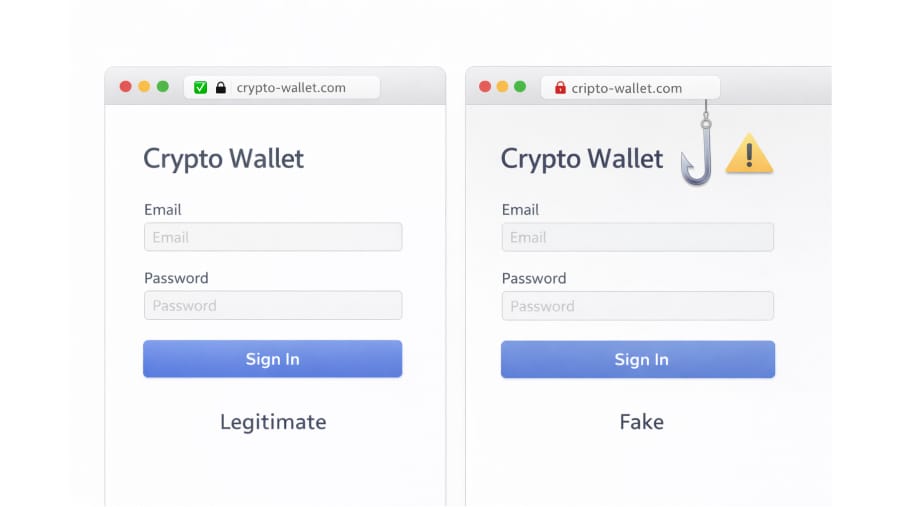
In crypto specifically, phishing often looks like this: a fake website that mimics a popular wallet or exchange, asking you to “connect” or “verify” your wallet. A fake airdrop page, offering free distribution of tokens, that asks you to sign a transaction. Or a social media account pretending to be official support, asking you to share your seed phrase to “resolve an issue.”
How can you spot it? Make sure to always check the URL carefully. Phishing sites often use addresses that look almost right but have a small difference — a swapped letter, an extra word, or an unfamiliar domain.
If you didn’t go looking for a site yourself, be suspicious of any link that asks you to connect your wallet.Phishing tricks you into giving something up voluntarily. The next threat is sneakier — it can drain your wallet even after you've done everything right, simply because of a permission you granted and forgot about.
Malicious Smart Contracts and Token Approvals
This one is specific to decentralized finance (DeFi). When you use a DeFi application — say, a decentralized exchange where you can swap one token for another — you typically need to grant that application permission to move tokens on your behalf.
This permission is called a token approval.
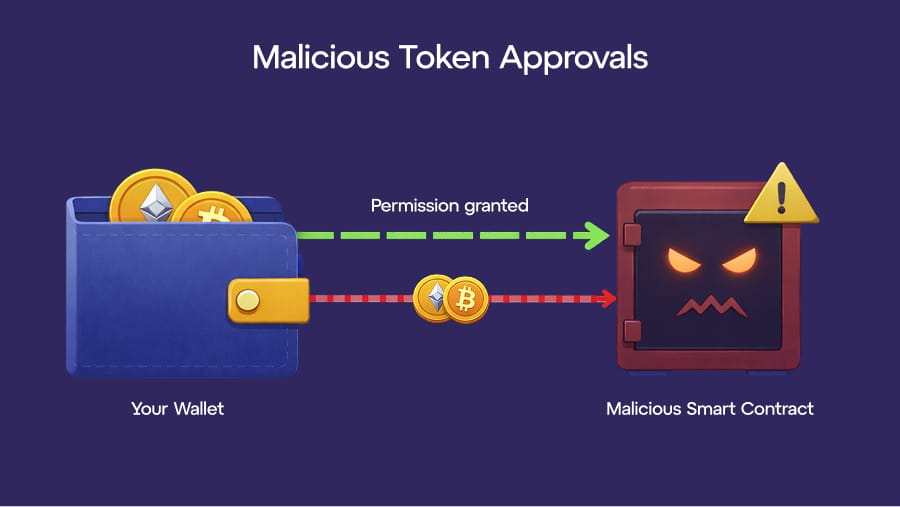
Here’s the problem: approvals don’t expire on their own.
Once you approve a smart contract — a self-executing program on the blockchain — it can access those tokens until you manually take that permission away, which is called revoking. If the contract turns out to be malicious, or if it gets compromised later, the attacker can drain the tokens you approved without needing any further action from you.
The good news is that tools exist to help you manage this. Services like revoke.cash are build for this purpose: they let you review your active token approvals and revoke any that you no longer need.
Making this a regular habit is one of the simplest ways to reduce your exposure to this kind of risk.So far, the attacks we've covered exploit what you do on-chain. But some threats start somewhere more familiar — your phone.
SIM Swapping
Many online accounts use two-factor authentication, often shortened to 2FA — a second layer of verification beyond your password. The most common form sends a code via text message to your phone.
SIM swapping is an attack where a criminal convinces your mobile carrier to transfer your phone number to a new SIM card that they control. Once they have your number, they receive your 2FA codes and can break into any account that relies on SMS verification.
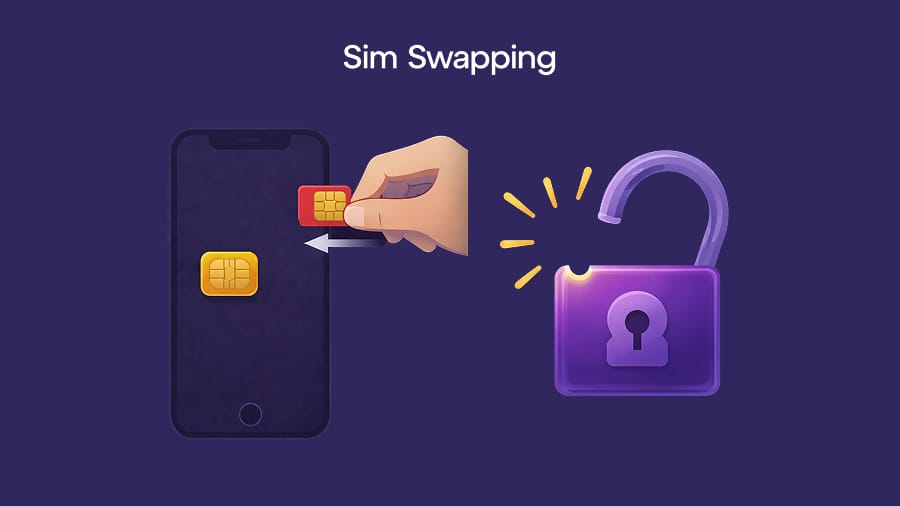
This doesn’t require any special hacking skill. Attackers typically use personal information found online — or even bribe carrier employees — to carry out the attack.
The takeaway: SMS-based 2FA is the weakest form of two-factor protection. We’ll cover better alternatives in the defensive toolkit section below. SIM swapping targets your phone number. The next attack vector goes even closer to home — it targets your own device, working silently in the background while you go about your day.
Malware and Clipboard Hijackers
This is one of the sneakier threats.
A clipboard hijacker is a type of malware — malicious software installed on your device without your knowledge — that watches for crypto wallet addresses. When you copy an address to send funds, the malware silently replaces it with the attacker’s address.
You paste what you think is the right destination, confirm the transaction, and your crypto goes straight to a thief.
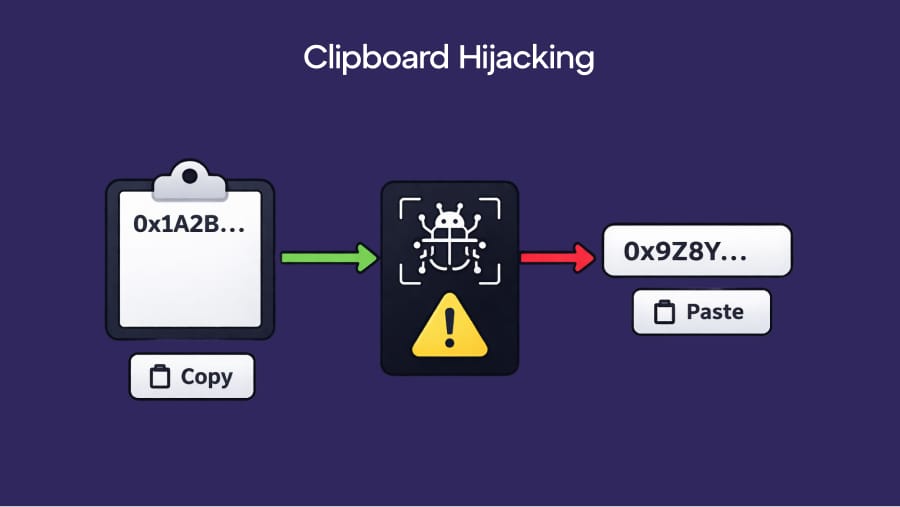
The defense is simple but absolutely crucial: always double-check the wallet address after pasting it, comparing at least the first and last several characters. It takes five seconds and can save you a lot of pain.
Now that you understand how crypto gets lost and how it gets stolen, let’s put together a practical plan for keeping yours safe.
Your Defensive Toolkit
Security doesn’t have to be complicated. The steps below won’t make you invulnerable — nothing can — but they cover the vast majority of real-world threats. Think of them as the basics that every crypto holder should have in place.
Hardware Wallets
A hardware wallet is a small physical device — often about the size of a USB drive — designed to store your private keys offline. Because the keys never touch an Internet-connected device, they’re protected from phishing sites, malware, and remote hacks.
When you want to make a transaction, you plug the device in, verify the details on its screen, and physically confirm the action.
Do you need one right away? If you’re holding a small amount of crypto for learning purposes, a software wallet on your phone or computer is generally fine. But once your holdings reach an amount you’d be seriously upset to lose, a hardware wallet is one of the most effective upgrades you can make to your crypto wallet security.
Seed Phrase Storage
Your seed phrase is the master key to your wallet. The rules for protecting it are strict but simple:
⚠️ WARNING: Never store your seed phrase digitally. Do not photograph it. Do not save it in a notes app, in cloud storage, or in an email draft. Do not type it into any website, ever. Write it down on paper — or stamp it into metal for durability — and store it in a secure, offline location. Consider keeping a second copy in a separate physical location in case of fire, flood, or theft.
Revoking Old Token Approvals
If you’ve ever used a DeFi app, there’s a good chance you have active token approvals you’ve forgotten about. Make a habit of reviewing and revoking approvals you no longer need.
Strong Two-Factor Authentication
As we covered earlier, SMS-based 2FA is vulnerable to SIM swapping. A much stronger option is an authenticator app — a program on your phone that generates time-sensitive codes locally, without any involvement from your mobile carrier. Popular options include Google Authenticator and Authy.
For the most sensitive accounts, you can provide even stronger protection with a physical security key — a small hardware device that plugs into your computer and verifies your identity.
Bookmark Official Sites
One of the easiest anti-phishing habits costs nothing: bookmark the official websites of every exchange and DeFi platform you use, and always access them from your bookmarks rather than from a search engine.
Phishing sites regularly appear in search results and ads, sometimes even above the real site. By bookmarking verified websites, you remove that risk entirely.
The “Too Good to Be True” Rule
Not every crypto loss is caused by a technical exploit. Many of the biggest losses come from something much simpler: people being deceived by other people.
This is social engineering, and it works because it targets emotions — excitement, urgency, fear — rather than software.
A few patterns come up again and again. Fake influencers or celebrity accounts on social media promising to “double your Bitcoin” if you send them crypto first — these are always scams, no exceptions.
Accounts impersonating exchange support staff in Telegram groups or on X, offering to “help” with a problem you posted about — real support teams will never message you first, and they will never ask for your seed phrase or private key. So-called “recovery agents” who claim they can retrieve stolen or lost crypto for an upfront fee — these are almost always scams that target people who have already been victimized once.
The underlying principle is worth memorizing: no legitimate person or service in Web3 will ever ask for your seed phrase. Not tech support. Not a wallet provider. Not an exchange. Not anyone. If someone asks, they are trying to steal from you. Period.
More broadly, if an offer sounds too good to be true — free crypto, guaranteed returns, risk-free profits — it almost certainly is. Remember: healthy skepticism is one of the most powerful security tools you have.
FAQ
Is a hot wallet safe to use?
A hot wallet is any wallet connected to the internet — including browser extension wallets and mobile apps. Hot wallets are convenient for everyday use and small amounts, but they’re more exposed to online threats like phishing and malware than a hardware wallet. The general rule: use a hot wallet for what you’re actively using, and move larger holdings to a hardware wallet for long-term storage.
What happens if I lose my seed phrase?
If you lose your seed phrase and can’t access your wallet through any other method, those funds are permanently inaccessible. There is no recovery service, no support team, and no workaround. This is why secure seed phrase storage is so critical — it’s not a nice-to-have, it’s the single most important thing you do as a crypto holder.
Can stolen crypto ever be recovered?
In most cases, no. Blockchain transactions are irreversible by design. If someone transfers your crypto to their wallet, there is no “undo” button. In rare cases involving centralized exchanges, law enforcement has sometimes been able to freeze stolen funds, but this is the exception, not the rule. Prevention is far more reliable than any attempt at recovery.
What’s the safest way to store a seed phrase?
Write it down by hand on paper or, for greater durability, stamp it into a metal plate. Store it in a secure, offline location — a safe, a lockbox, or a safety deposit box. Consider keeping a second copy in a different physical location to protect against localized disasters. Never store it digitally in any form.
How do I know if I’ve already given a bad approval?
You can check your active token approvals using tools like revoke.cash. Connect your wallet, and the tool will show you every smart contract you’ve granted spending permission to. If you see contracts you don’t recognize or no longer use, revoke them immediately. It’s a quick process and well worth doing regularly.